1. Export a CSV marker file from Pix
Open the comments panel on the right side in Pix. Press the three dots and select "Export". Now you can then download the CSV file from Pix.

The timecode in Pix starts with 00:00:00:00 for each clip, so you may need to use the offset function on EditingTools.io to sync it with you timeline or move it manually in your NLE (editing software).
2. Use the "Μετατροπέας Markers" to convert the CSV marker file into a CSV file
Open the free Μετατροπέας Markers, select "Pix Systems > Comments (.csv)" and set "convert" to "CSV for Google Sheets". Generate and download the file. Αν αντιμετωπίζετε προβλήματα με τη μετατροπή του αρχείου, μπορείτε να επικοινωνήσετε με τη δωρεάν υποστήριξη.
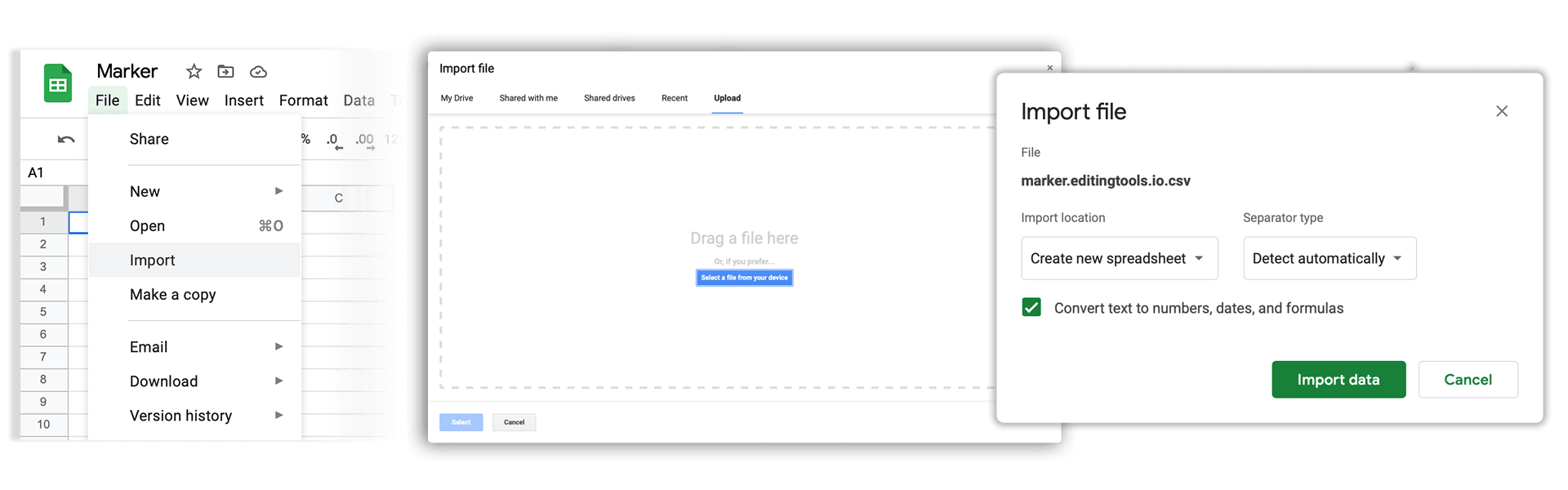
3. Import the CSV file into Google Sheets
Open Google Sheets and go to "File -> Import". Upload the generated CSV file and press "Import Data" to generate the Sheet with all markers.
🚀 Έτοιμο
Αυτά για την ώρα! Αν βρήκατε χρήσιμο αυτόν τον οδηγό, μοιραστείτε τον για να μας υποστηρίξετε. Αν έχετε προτάσεις για το πώς θα μπορούσαμε να βελτιώσουμε τη ροή εργασίας, ενημερώστε μας!